See what Pendara does — then sign in as you
Track every rupee, automatically categorized

A tour before you sign up
A quick tour of what Pendara does, before you even create an account.
Track every rupee, automatically categorized
A tour before you sign up
A quick tour of what Pendara does, before you even create an account.
Sign in and you're in
Google sign-in or email — your data syncs across devices either way.
Your money, understood in one glance
Switch your books
That pill is a ledger switcher. Keep a masjid's or a business's money in a completely separate set of accounts, categories and transactions — one tap from your own.
Switch your books
That pill is a ledger switcher. Keep a masjid's or a business's money in a completely separate set of accounts, categories and transactions — one tap from your own.
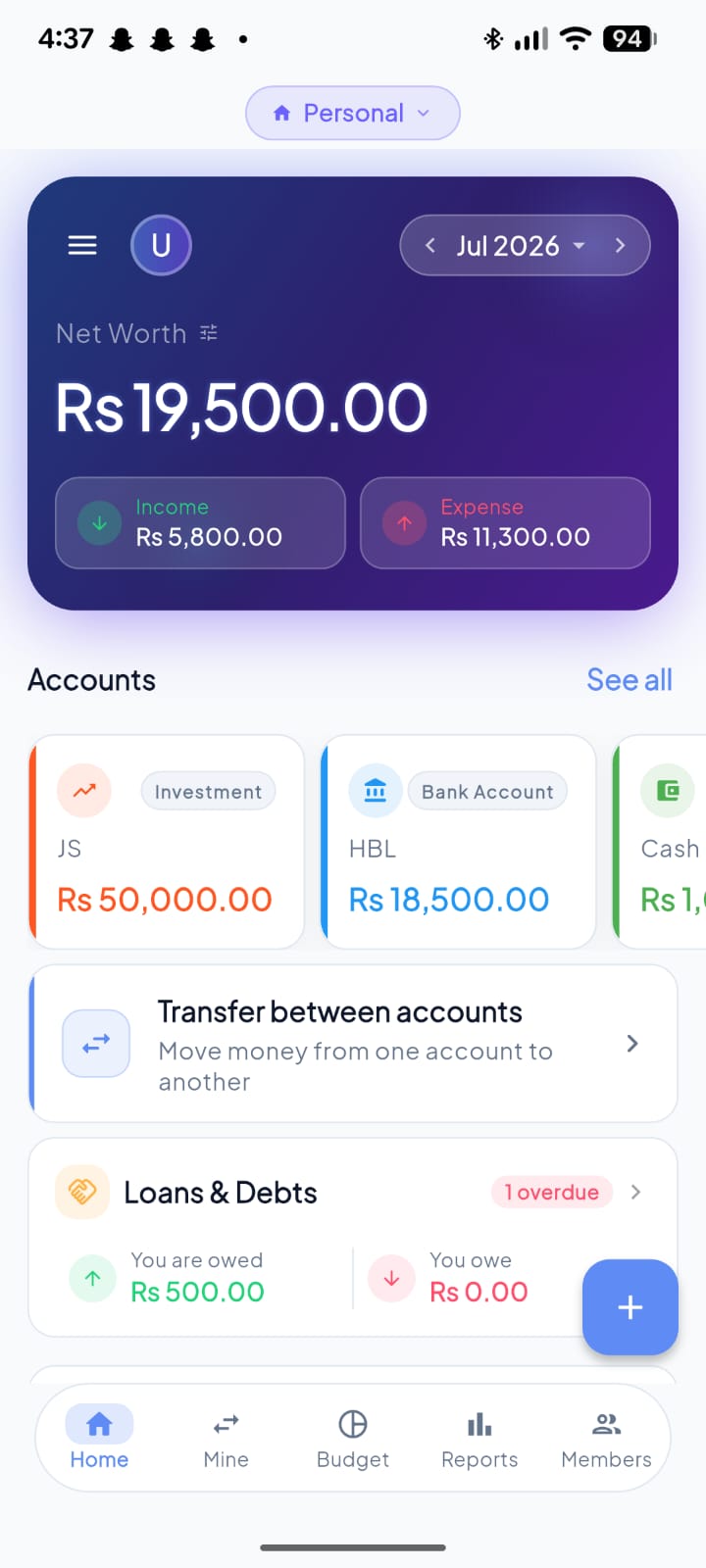
Net worth, up front
The first number you see. The small ⚙ beside it lets you decide what counts — borrowed money, fund collections and savings goals can each be left out of the total.
This month, in two numbers
Income against expense for the month you're viewing. Here: Rs 5,800 in, Rs 11,300 out— you're spending down savings, and it says so plainly.
Every account, one swipe
Investment, bank, cash — each with its live balance and its own colour. Swipe sideways for the rest.
What you're owed, on the home screen
Loans don't hide in a submenu. Rs 500 owed to you, Rs 0 owed by you — and a red 1 overdue the day something slips.
Every rupee, logged and searchable
Expense or income
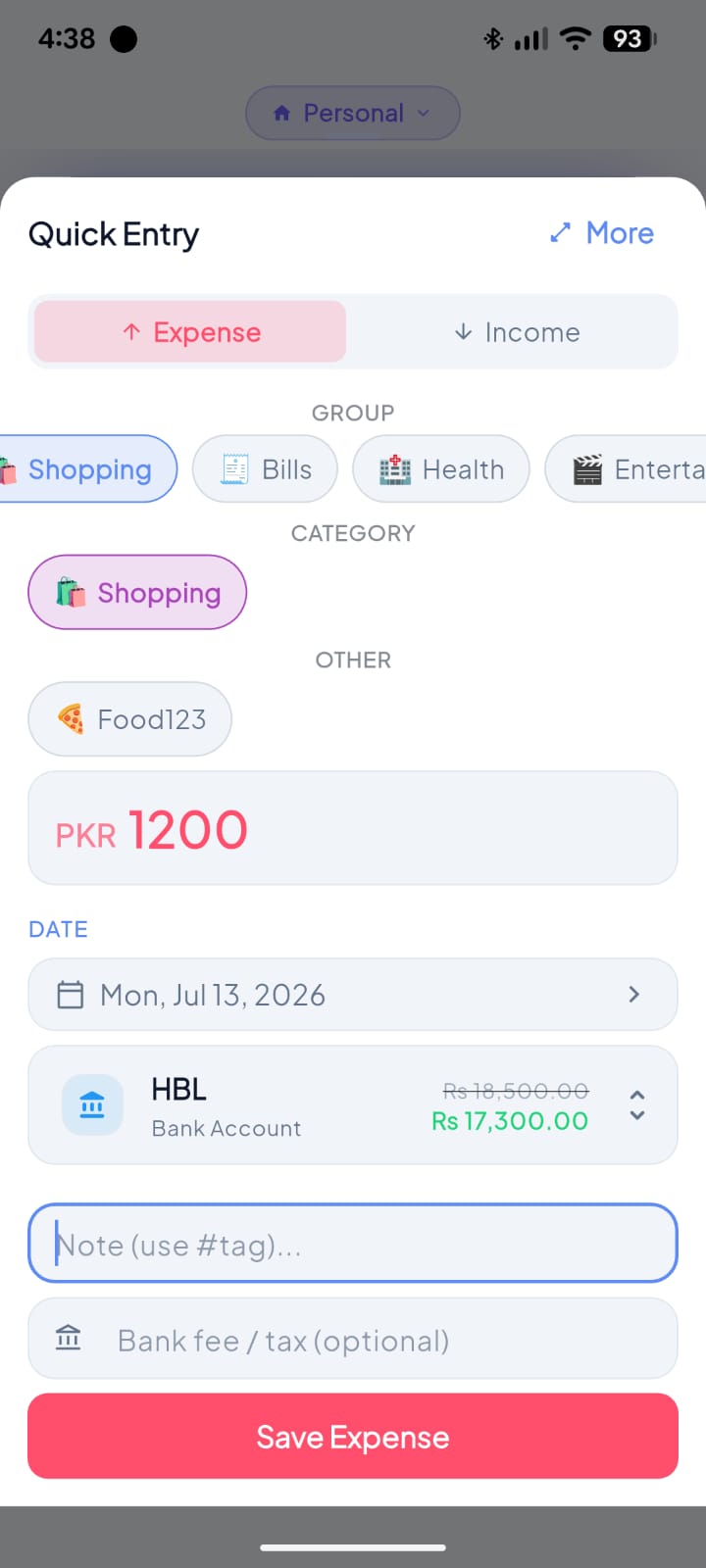
One tap sets the direction. Expense is preselected, because that's what you're usually logging.
Expense or income
One tap sets the direction. Expense is preselected, because that's what you're usually logging.
Pick the group
Broad buckets first — Shopping, Bills, Health, Entertainment. Swipe the row for the rest.
Then the category
The group narrows the list, so you're picking from a handful instead of scrolling past fifty categories.
Type the amount
Big field, number pad, done. The currency prefix comes from your settings — no unit to pick.
See the damage before you commit
Choose the account and it previews the result: HBL goes Rs 18,500.00 → Rs 17,300.00, struck through and in green, before you've saved anything.
Save
That's the whole flow. Group, category, amount, save — a few seconds standing at the counter.
Budgets that keep you honest
Budget one category
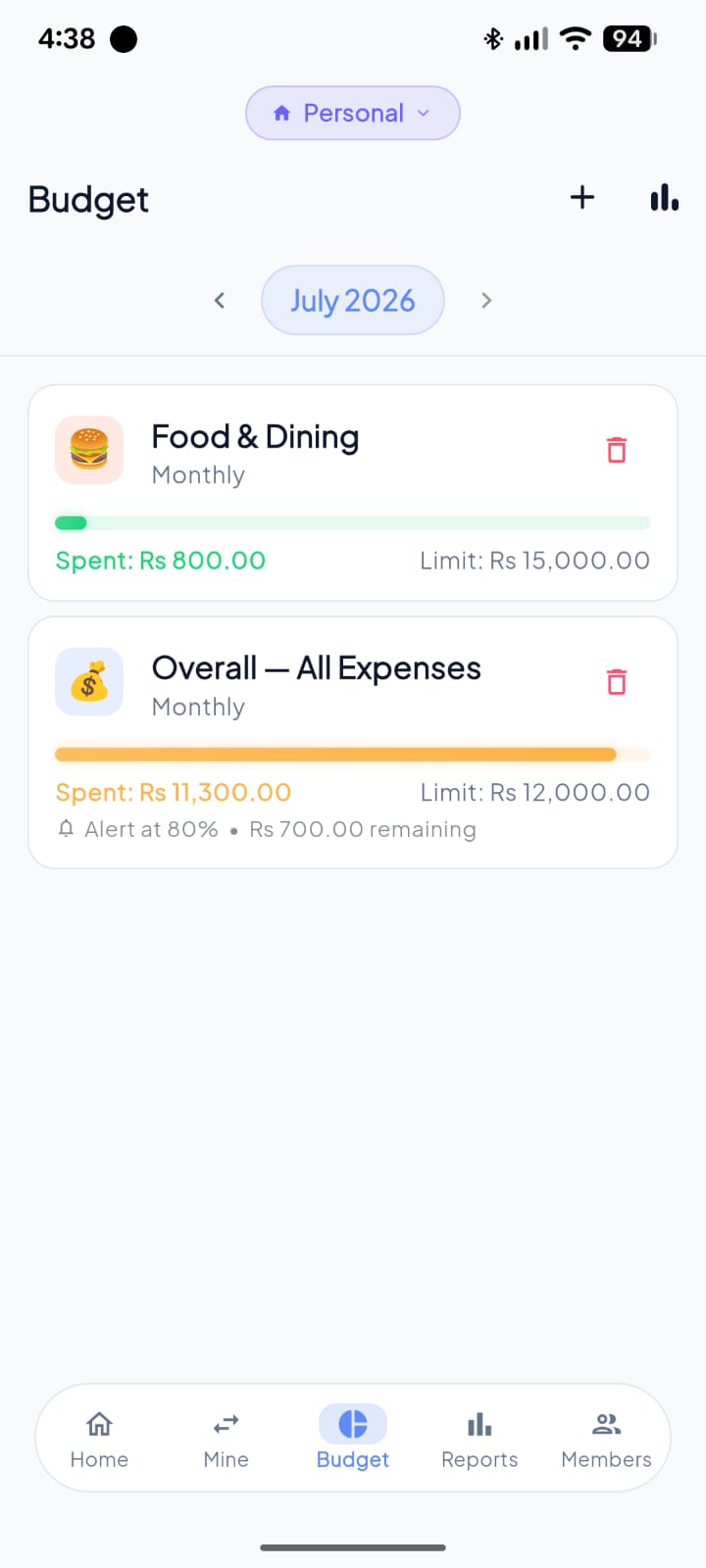
Food & Dining, capped monthly at Rs 15,000. The bar is green because at Rs 800 spent there's plenty of room.
Budget one category
Food & Dining, capped monthly at Rs 15,000. The bar is green because at Rs 800 spent there's plenty of room.
Or cap everything at once
Overall — All Expenses is a single ceiling across every category. Rs 11,300 against a Rs 12,000 limit, so the bar has gone amber.
It warns you before you cross
Alert at 80% · Rs 700.00 remaining.You pick the threshold; Pendara watches it and tells you while there's still time to act.
The warning finds you, not the other way round
The warning leaves the app
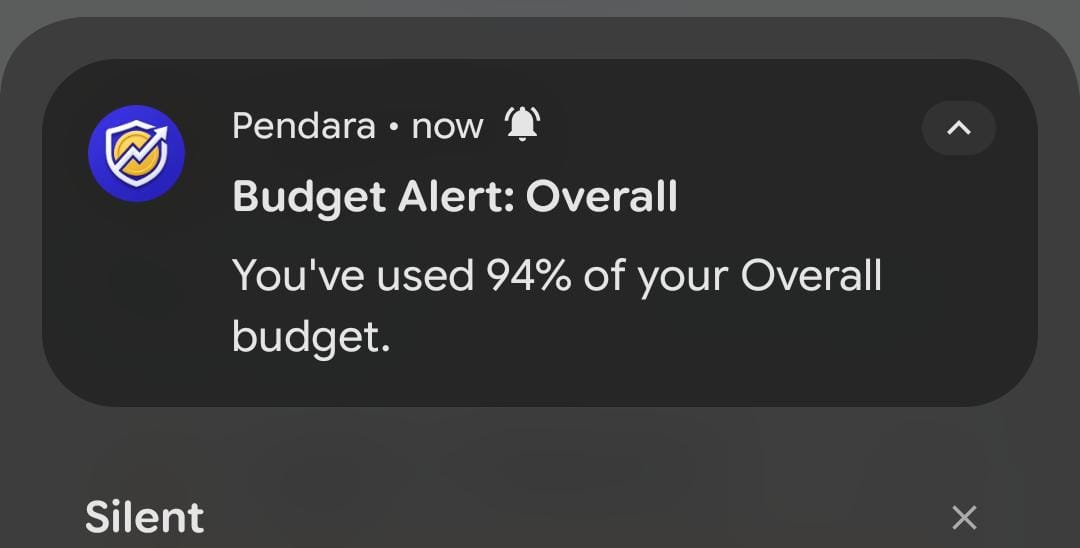
You don't have to open Pendara to find out. “Budget Alert: Overall — You've used 94% of your Overall budget.” — delivered the moment you cross the line you set.
The warning leaves the app
You don't have to open Pendara to find out. “Budget Alert: Overall — You've used 94% of your Overall budget.” — delivered the moment you cross the line you set.
Says which budget, and how far
Not a vague nudge. It names the budget and gives the exact percentage, so you know whether to slow down or stop.
Organize spending your own way
Categories
Categories
Edit Group
Categories, grouped the way you actually spend
Every category lives inside a group — swipe through groups, drill into subcategories, or export a category's history straight from the row.
Categories
Categories, grouped the way you actually spend
Every category lives inside a group — swipe through groups, drill into subcategories, or export a category's history straight from the row.
Categories
Edit Group
Rename a group, pick a new emoji — right from its report
Tap any group to open Edit Group: rename it, swap the emoji, done. Every budget and transaction under that group updates instantly.
See exactly where your money goes
Month or year
Every figure below recalculates for the window you pick.
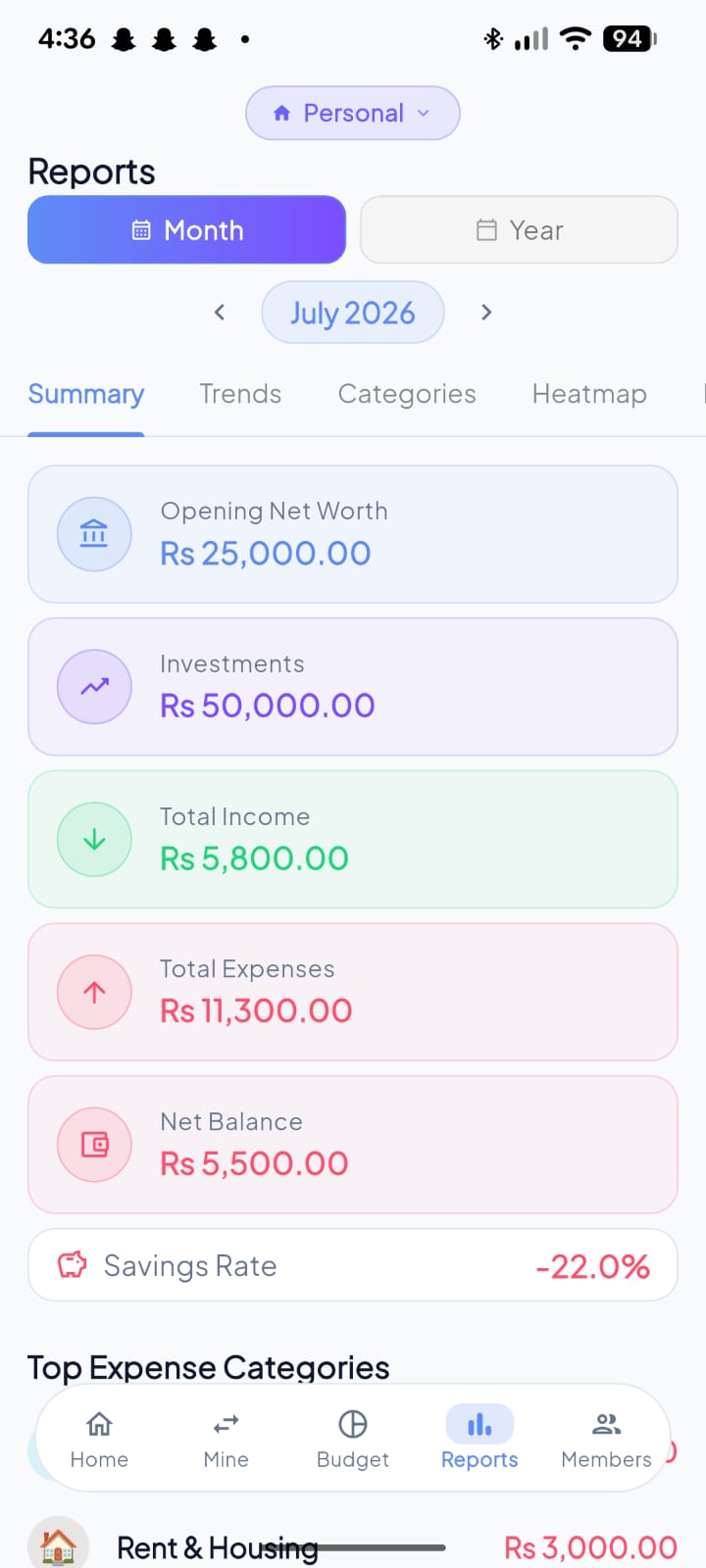
Month or year
Every figure below recalculates for the window you pick.
Five ways to read it
Summary, Trends, Categories, Heatmap, Export — the same month, five different questions.
What you started with
Opening net worth and investments, so the month's movement has something to be measured against.
In, out, and what's left
Rs 5,800 income against Rs 11,300 of expenses. Net balance Rs 5,500 — printed in red, because the month went backwards.
The number that doesn't flatter you
Savings rate: −22.0%. Pendara doesn't round that into something more comfortable.
Spot the days that actually hurt
A month at a glance
The Heatmap tab trades the list view for a calendar.
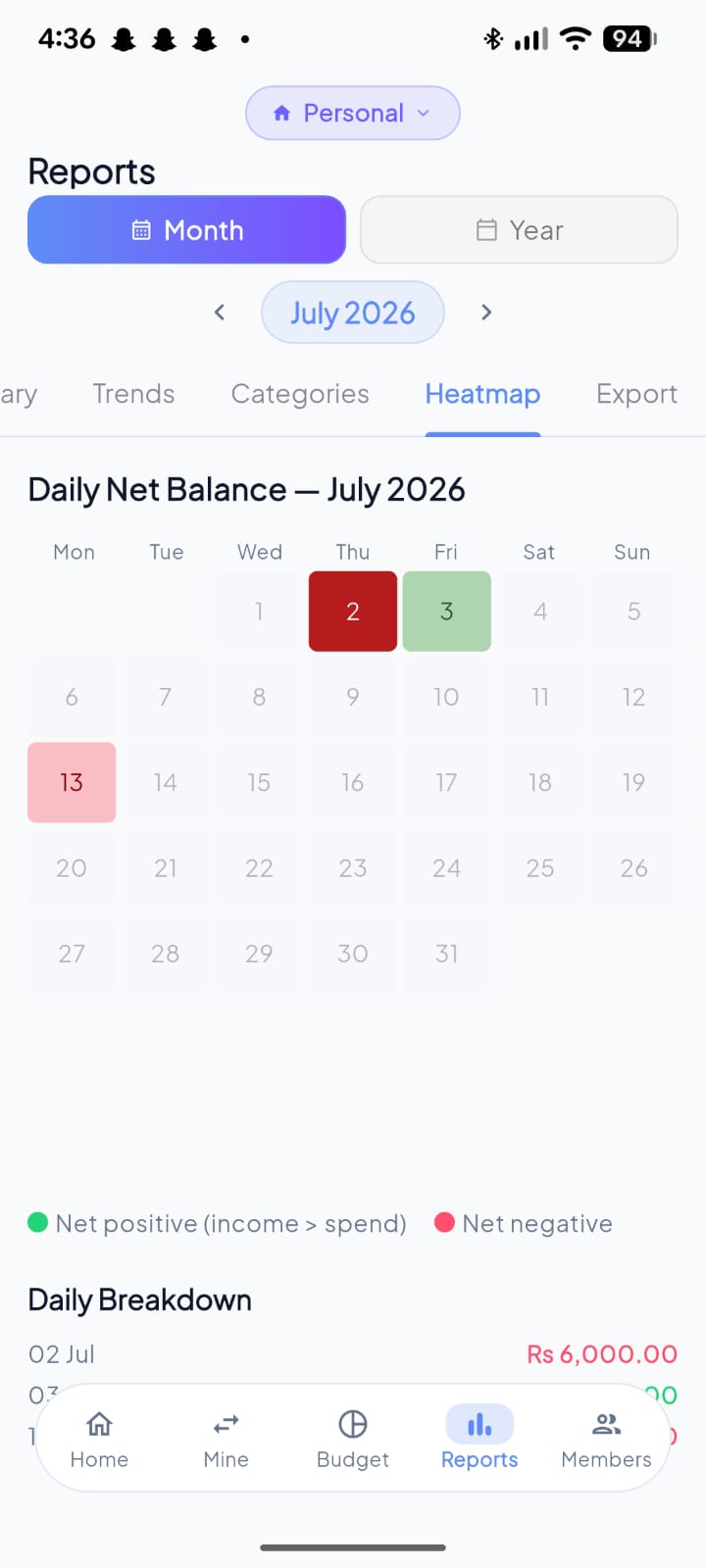
A month at a glance
The Heatmap tab trades the list view for a calendar.
Colour is the whole story
Every day of July, shaded by net balance. Grey days were quiet; coloured days moved money.
Good day, bad day
The 2nd is deep red — Rs 6,000 out. The 3rd is green: income beat spending. Two seconds to spot the days that actually mattered.
Then the receipts
Daily Breakdown lists each coloured day with its figure, turning the pattern back into specifics.
One app, everyone's spending
One tab per person
Brother, Wife — each family member gets their own space instead of one merged pile of transactions.
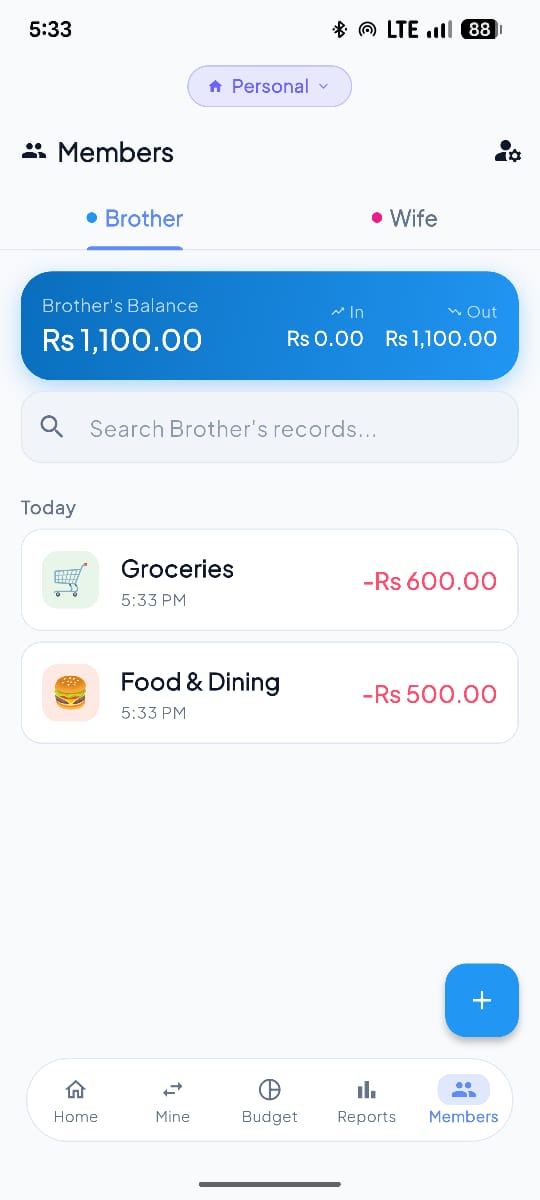
One tab per person
Brother, Wife — each family member gets their own space instead of one merged pile of transactions.
Their balance, separately
Rs 1,100 for Brother this period: Rs 0 in, Rs 1,100 out. Yours stays yours.
And their spending
Groceries Rs 600, Food & Dining Rs 500 — timestamped, categorised, and searchable within that one person.
Money you've lent, tracked and settled
Lent and borrowed, kept apart
Two tabs. Money you're owed and money you owe never get folded into one confusing total.
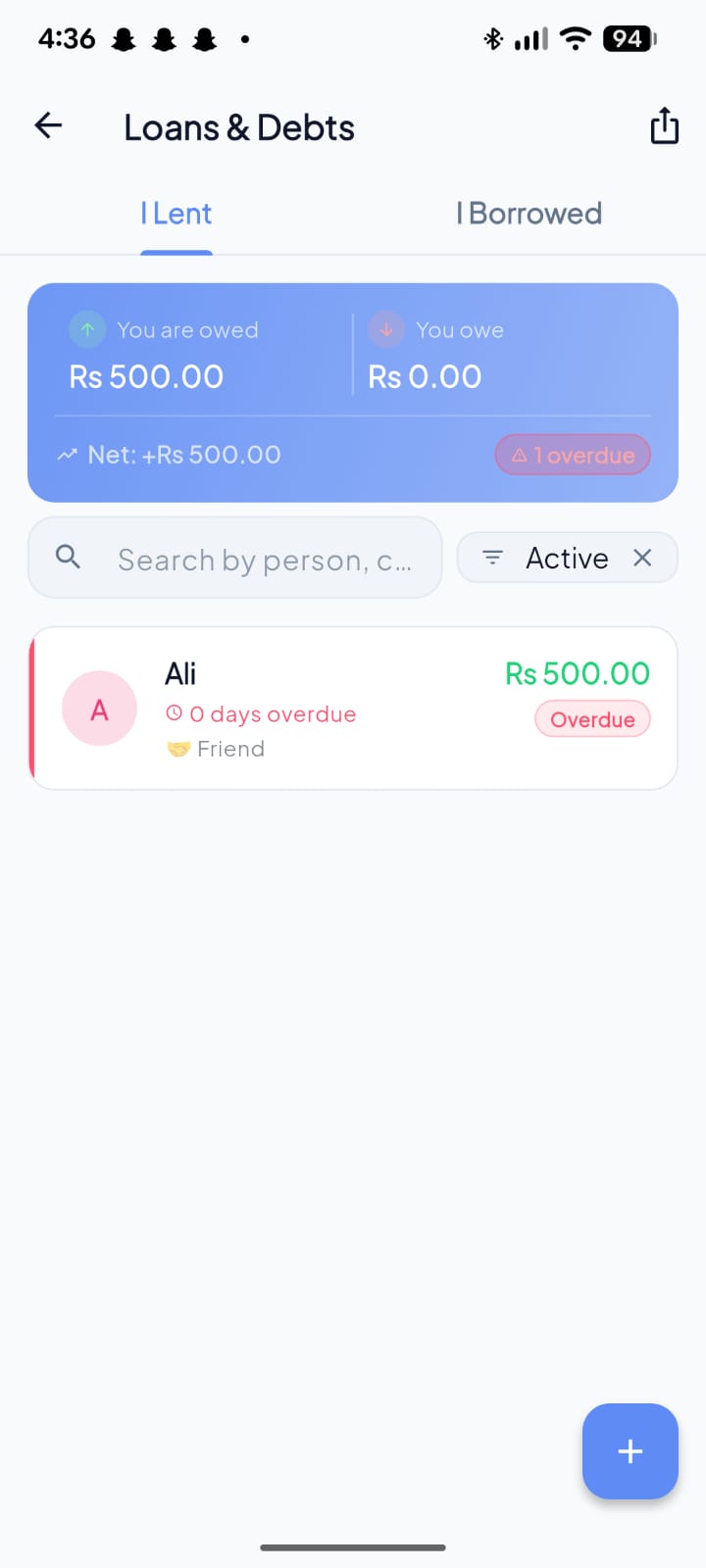
Lent and borrowed, kept apart
Two tabs. Money you're owed and money you owe never get folded into one confusing total.
The net position
Owed Rs 500, owe Rs 0, net +Rs 500— the summary you'd otherwise keep in your head.
Overdue, called out
1 overduesits right on the summary card in red. You don't have to go looking for it.
Who, how much, how late
Ali, Rs 500, tagged Friend, flagged the day it came due. Log a repayment from this row and every balance updates with it.
Every balance, always in sync
Verify Balances
All your accounts, one balance
Bank, cash, investments — every account's balance, plus quick transfers between them.
All your accounts, one balance
Bank, cash, investments — every account's balance, plus quick transfers between them.
Verify Balances
Spot a balance mismatch instantly
See your app balance next to what your bank actually shows — differences are flagged the moment you type, so you always know which account needs a correcting entry.
No signal, no problem
No signal, still working
Airplane mode on. One honest banner: “Offline — changes will sync when reconnected.”
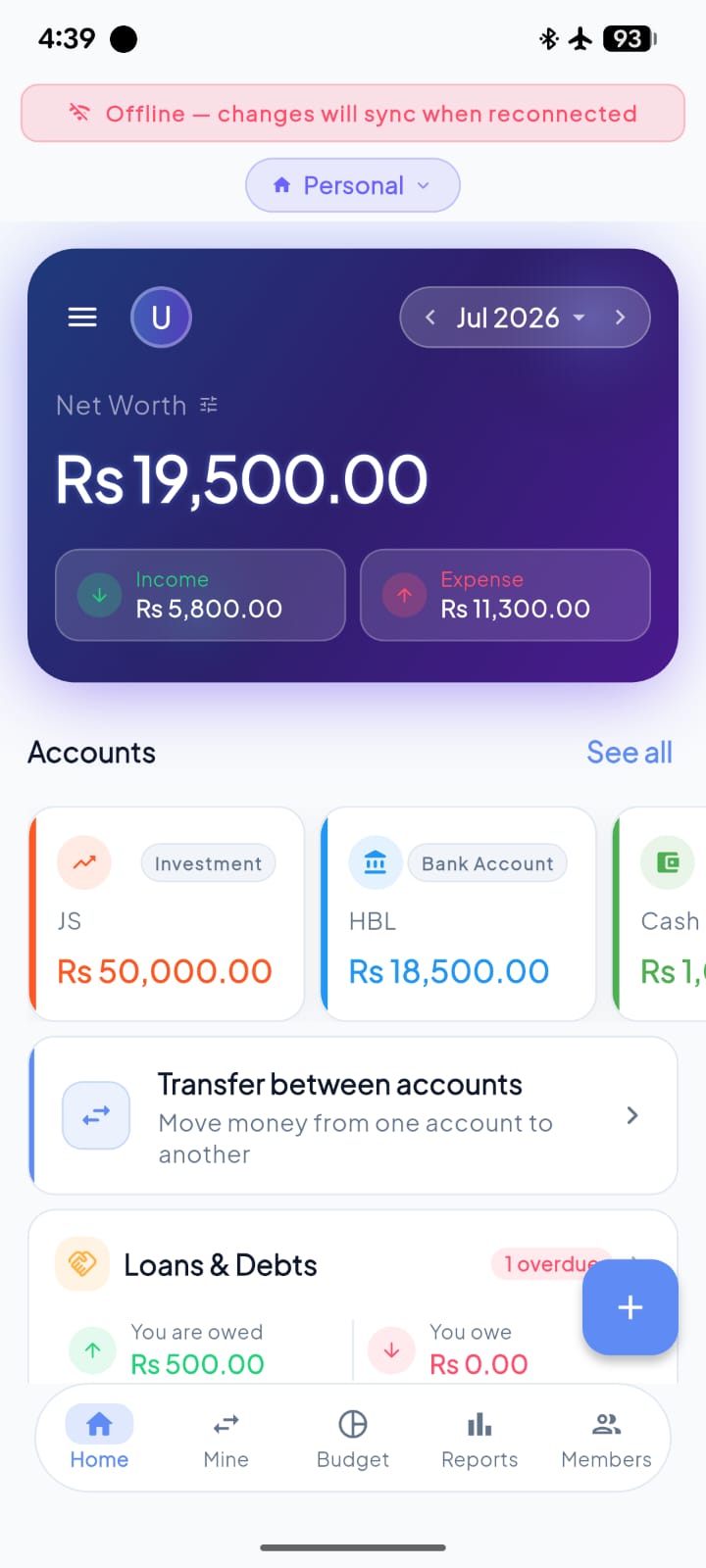
No signal, still working
Airplane mode on. One honest banner: “Offline — changes will sync when reconnected.”
Nothing else changes
The dashboard underneath is fully live — balances, accounts, loans — and you can still add transactions. They queue up and sync the moment you're back.
Hold money for someone else, without it becoming yours
Funds
Funds
Money you're holding, not money you own
Collecting for a masjid, madrissa or committee? Each fund is its own ledger — its own balance, its own category breakdown, out of your everyday spending.
Funds
Money you're holding, not money you own
Collecting for a masjid, madrissa or committee? Each fund is its own ledger — its own balance, its own category breakdown, out of your everyday spending.
Funds
It stays out of your net worth
Log what others give you, what you contribute yourself, and what you pay out on the fund's behalf — Pendara keeps the collections out of your own net worth, so holding Rs 60,000 for a committee never looks like you got Rs 60,000 richer.
Rotating savings circles, without the spreadsheet
Office Committee
A rotating savings circle, tracked to the rupee
Everyone contributes the same amount each cycle, and one person takes the whole pot — Pendara tracks who's paid, who hasn't, and whose turn is next.
Watch your goals fill in, ring by ring
Savings Goals
Savings goals you can actually see progress on
Set a target, save toward it, watch the ring fill in — separate from your everyday budget.
Your income trajectory, laid out
Salary History
Track every raise
Log every raise or salary change over time — see your income trajectory at a glance.
Bills that remind themselves
Recurring
Never miss a recurring bill
Bills, income, and even a standing transfer between your own accounts — tracked automatically, with a reminder before anything's due.
Snap it, say it, or just ask
Pendara AI
ProAsk instead of hunting
Pendara AI reads your books and can propose adds and edits for one-tap confirmation — it never writes on its own. Receipt scan and voice entry ship with the same Pro tier.
Set it up the way you like
Settings
Make it yours
Currency, notification preferences, data import, dark mode — tucked away but easy to find.